Overheating and Fan Replacement How PCC Computers Wollongong Saved a Gamers Laptop
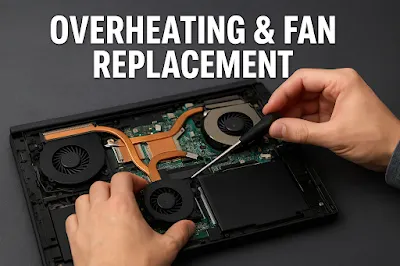
Laptop overheating is one of the most common and frustrating issues faced by gamers. High-performance games demand heavy GPU and CPU usage, and when a laptop’s cooling system isn’t functioning at its best, it can quickly turn a gaming session into a nightmare. This case study highlights how PCC Computers Wollongong resolved a severe overheating problem and restored a smooth gaming experience for a customer.
Customer Background
Location: PCC Computers, Wollongong
Customer: A passionate gamer
Problem: The laptop frequently overheated and shut down in the middle of gaming sessions.
The customer reported that the laptop would run extremely hot within minutes of launching a game. The system would then automatically shut down to prevent hardware damage. This made gaming impossible and raised concerns about long-term component failure.
Scenario Overview
The symptoms clearly indicated a cooling system failure. Overheating in gaming laptops can occur due to several reasons:
- Dust accumulation blocking ventilation.
- Failing cooling fan.
- Dried or ineffective thermal paste.
- Poor air circulation.
- Software-level temperature control issues.
In this case, physical inspection was necessary to get to the root cause.
Technician Action: Step-by-Step Process
Full Disassembly & Internal Cleaning
The technician opened the laptop and immediately noticed heavy dust buildup around the heat sink and fan assembly. Dust can significantly restrict airflow, causing the system to trap heat.
Removal of Old Thermal Paste
The old thermal paste on the CPU and GPU had dried out. This reduces heat transfer, making the processor run hotter than normal. The technician carefully cleaned off the old layer using high-grade isopropyl alcohol.
Installation of a New Cooling Fan
Upon testing the fan, the technician confirmed it was faulty — it wasn’t spinning at the required speed. A genuine replacement fan was installed to restore proper airflow.
Application of Fresh Thermal Paste
High-performance thermal paste was applied to the CPU and GPU to improve thermal conductivity and regulate temperature during heavy gaming usage.
Stress Testing for Validation
After reassembling the laptop, the technician performed:
- GPU stress tests
- CPU benchmark tests
- Temperature monitoring under heavy loads
The laptop remained cool and stable throughout these tests.
Outcome: Problem Solved
After the service:
- The laptop no longer overheated, even under high-intensity gaming.
- There were no unexpected shutdowns.
- The cooling system functioned smoothly with improved airflow.
- The gamer reported a noticeably faster, more stable performance.
This successful repair not only enhanced the device’s gaming capabilities but also extended the overall lifespan of the laptop.
Key Takeaways
- Regular laptop maintenance is essential for gamers.
- Overheating is often linked to poor airflow, dust, thermal paste failure, or fan damage.
- Timely repair prevents permanent hardware damage and costly replacements.
- Professional servicing ensures proper cleaning, component replacement, and thermal improvements.